


MoodBoard maker - HomeBoard
4.011.00 Reviews
App Specs
- Version
- 1.11.1
- Updated On
- License
- Free
- Downloads
- 50,000+
- Developer
- VDMNSZK Ltd.
- Categories
- House & Home
- Platform
- Android, iOS
Screenshots
 Analysis by AppCompare
I like home-design apps best when they help me make a decision, not just collect pretty pictures. MoodBoard maker - HomeBoard is aimed at that in-between stage: I have a room to rethink, a few ideas in mind, and no clear sense yet of whether they belong together. It gives those ideas a place to take shape before I spend money or start moving furniture. That makes it useful as a creative planning tool, though I would treat its visual concepts as a starting point rather than a substitute for measurements and practical checks.
Where HomeBoard helps ideas become plans
HomeBoard is a free house and home design app from VDMNSZK Ltd. Its average rating is 4.1 from 331 ratings, and it has passed 50K+ installs. The app is rated for Everyone, so it is accessible to a broad audience. Version 1.11.1 requires Android 8.0 or later; optional in-app purchases range from $1.99 to $39.99 per item. Those purchases are worth keeping in mind if you want to explore beyond what is available without paying.
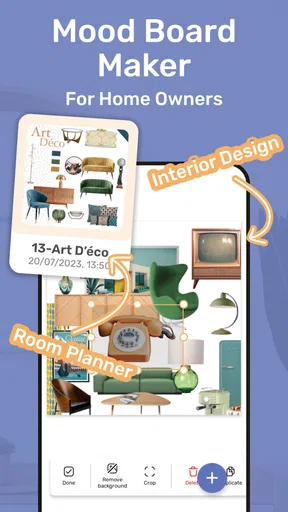
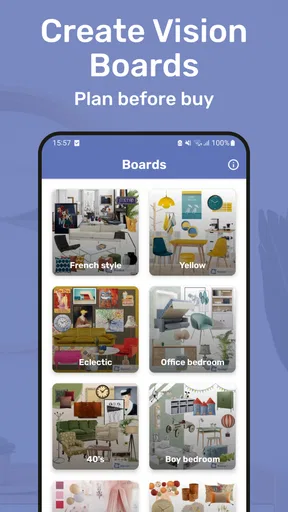
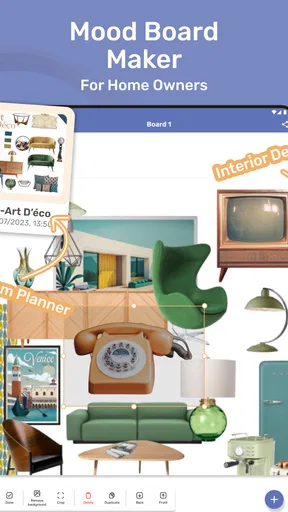
The most appealing idea here is the mood board itself: a visual space where colors, furniture, and textures can be considered together instead of in separate screenshots or saved notes. That changes the task from “I like this chair” to “does this chair make sense beside the rug and wall color I’m considering?” I find that shift valuable because home choices are rarely made in isolation. A board can help reveal that several attractive choices do not actually form a comfortable room.
A useful way to compare choices
Let’s dive into what makes MoodBoard maker - HomeBoard such a nifty tool. Right off the bat, the app greets you with a clean, user-friendly interface. You know how some apps bombard you with too many options right from the start? This one keeps it simple and lets you focus on what really matters—your design vision.
Once inside, you’ll find a treasure trove of features. You can create mood boards by mixing and matching different elements like textures, colors, and furniture pieces. The drag-and-drop feature is a game-changer here. It’s as easy as pie to visualize your dream room, whether it's a cozy reading nook or a chic living room.
For a realistic first project, I would pick one specific decision rather than trying to redesign an entire home at once. A living-room board could focus on a sofa and two possible rug colors; a bedroom board might compare wood tones and bedding colors. Keeping the question narrow makes it easier to tell which elements are helping and which are competing for attention. It also gives you a useful reference when you discuss the idea with someone else.
What the visual tools can and cannot settle
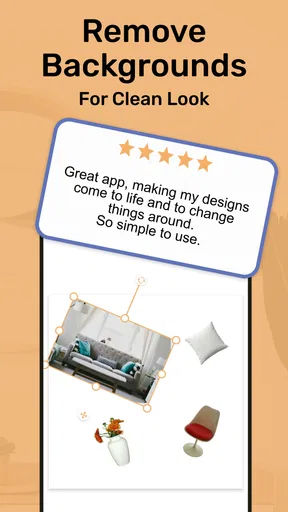
So, what’s the magic sauce? One of the standout features is the extensive library of items you can incorporate. From modern minimalist chairs to rustic wooden tables, it feels like having a virtual IKEA catalog at your fingertips. And the best part? You can adjust sizes and colors to see what fits best in your space.
Worth Reading Before You Choose

EA SPORTS FC Mobile 26 Is a Bigger Football Game, but It Takes Time

Flipboard Shows What News Apps Must Do Beyond the Feed

Switching to Android Auto Means Rethinking Your Driving Routine

Google Calendar Makes a Crowded Week Easier to Manage

Ludo King Makes the Most of the Minutes Between Plans

Baby Panda World Brings Quick Play to Modern Phones, but Its Game Library Feels Busy
Another cool feature is the collaboration tool. If you’re working on a project with friends or family, you can share your boards and gather feedback. It's almost like having a virtual brainstorming session without leaving your couch.
Speaking of couches, the 3D visualization feature is another gem. It allows you to rotate and view your designs from different angles, giving you a comprehensive view of how your ideas come together in a real-world setting. It’s not just about pretty pictures; it’s about practical planning.
There is an important distinction between a convincing composition and a build-ready plan. Seeing an arrangement from different angles can make it easier to judge the overall feel, but I would still measure doorways, wall lengths, and the actual furniture before buying. Adjustable item sizes are useful for trying a rough fit, yet a visual mock-up should not be treated as proof that a real object will clear a corner or leave enough walking space. I would use the app to narrow choices, then confirm the details in the room.
From first idea to a more confident choice
Imagine being able to test out different color palettes or furniture arrangements without the commitment of buying anything. The app offers design templates that help you get started, especially if you’re stuck in a creative rut. You can tweak these templates or start from scratch—your call!
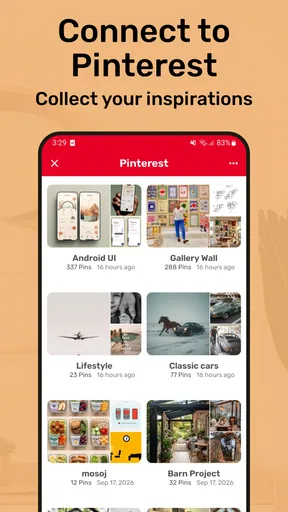
The app also integrates with online stores, so if you fall in love with a particular piece, you can easily find where to buy it. It’s like having a personal shopping assistant who knows exactly what your style is.
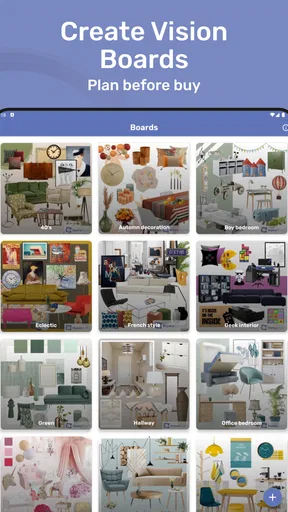
A practical workflow is to save alternatives on separate boards instead of continually replacing the same idea. For example, keep one version with a lighter palette and another with darker accents. When you return later, the difference is easier to judge than it would be from memory. If you are sharing a board, ask a focused question—such as which of two palettes feels calmer—rather than asking everyone whether the whole room looks good. Specific feedback is more actionable and less likely to turn into a collection of conflicting tastes.
The store connection can help turn inspiration into a shopping lead, but I would not let that be the only reason for choosing an item. Check the product’s real dimensions, material, delivery details, and suitability for your household before ordering. A visual match is only one part of a home purchase. For larger decisions, I would also compare the item with options from other retailers rather than assuming the first suggested route is the best fit.
Who will get the most from it
I think HomeBoard suits renters and homeowners who enjoy arranging ideas visually, especially when a room feels unfinished but they are not ready to commit to a purchase. It can also help couples, housemates, or family members talk through a shared space: a board gives everyone something concrete to react to instead of relying on descriptions like “warmer” or “less cluttered.” Beginners may appreciate starting from a template, while someone with a defined style can use a blank board to test a more personal combination.
It is less suited to anyone who needs a precise floor plan, construction documentation, or reliable measurements for renovation work. In that situation, a dedicated room-planning or architecture tool is a better choice. HomeBoard’s strength is visual exploration; using it as a technical drawing tool would ask it to do a different job. Likewise, if you simply want to save inspiration images with no interest in arranging them, a basic photo collection may be quicker and less involved.
Compared with the usual alternatives, HomeBoard sits between a free-form inspiration board and a more technical room planner. A folder of saved images is flexible but makes it hard to compare elements in one composition. A professional design tool can offer more control, but may take longer to learn and can feel excessive for choosing a palette or furniture direction. HomeBoard’s appeal is the middle ground: enough structure to arrange and discuss ideas, without making every small decorating decision feel like a formal project.
One trade-off is that a ready-made library can encourage people to choose from what is presented rather than search widely for the right real-world item. I would use the library to establish proportions, style, and color relationships, then look beyond it when the decision involves a specific purchase. Another is that collaboration is most helpful when participants agree on the goal first. If one person is optimizing for comfort and another for appearance, the board will expose that difference, but it cannot decide whose priorities should win.
For a typical evening project, I would take a photo or note of the room’s existing colors, choose one unresolved issue, and make two contrasting board versions. I might compare a warm, natural look with a cooler, cleaner one, then share both with the person I live with and ask which feels more welcoming. The next day, I would revisit the boards with fresh eyes and check any likely purchases against actual room measurements. That small pause matters: it helps separate a genuinely workable idea from one that only looked exciting in the moment.
If you are wondering whether you need design experience, I don’t think you do. Templates and visual arrangement make the app approachable for casual experimentation. If you are asking whether it can help you choose furniture, it can help you compare how pieces might work together, but I would verify specifications and fit elsewhere before buying. And if you want to work with another person, the sharing and feedback tools give you a way to discuss a board; I would keep the conversation focused so the feedback leads to a decision rather than more indecision.
A measured recommendation
All in all, MoodBoard maker - HomeBoard is a fantastic tool for anyone looking to revamp their space. Whether you’re a seasoned designer or a newbie just dipping your toes into the world of interior design, this app provides the perfect platform to experiment and explore.
It’s not just about creating beautiful designs; it’s about making the process enjoyable and stress-free. So, if you’re ready to transform your home into a masterpiece, give this app a whirl. You might just find that perfect balance between style and functionality.
My recommendation is specific: try HomeBoard if you want to compare decor ideas, put a room’s colors and furnishings into context, or make a shared decision easier. Go in with a question you want the board to answer, and treat the result as a visual guide rather than a measurement plan. If precision, comprehensive renovation planning, or a plain image archive is your priority, another kind of tool will serve you better. For the early, often messy stage of deciding what a room should feel like, HomeBoard offers a useful place to think things through.
Pros
- Intuitive interface for easy design creation.
- Wide variety of templates available.
- High-quality export options.
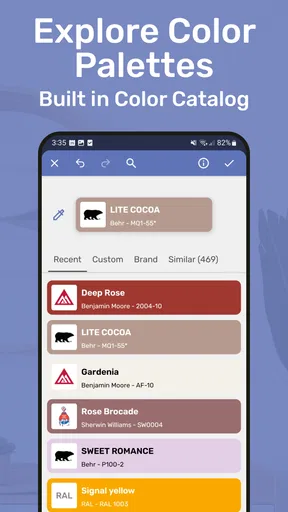
- Customizable color palettes.
- Responsive customer support.
Cons
- Limited free features without subscription.
- Occasional app crashes reported.
- Some tools can be hard to find.
- Requires internet for full functionality.
- Ads can be intrusive in free version.
FAQs for MoodBoard maker - HomeBoard
What is MoodBoard maker - HomeBoard and how does it work?
MoodBoard maker - HomeBoard is a creative app designed to help users compile and organize ideas visually. It allows you to create mood boards by adding images, text, and colors to a canvas, making it ideal for designers, artists, and planners. The app provides various templates and editing tools to customize your boards, streamlining your creative process.
Is MoodBoard maker - HomeBoard available for both Android and iOS?
Yes, MoodBoard maker - HomeBoard is available for both Android and iOS devices. You can download it from the Google Play Store for Android and the Apple App Store for iOS. The app is optimized for both platforms, ensuring a seamless user experience regardless of your device.
Does MoodBoard maker - HomeBoard require an internet connection to function?
While MoodBoard maker - HomeBoard can be used offline for creating and editing boards, certain features such as accessing cloud storage or downloading additional templates may require an internet connection. Offline functionality allows you to continue working on projects without interruption, but online access enhances the app’s capabilities.
Are there any in-app purchases or subscriptions in MoodBoard maker - HomeBoard?
MoodBoard maker - HomeBoard is free to download, but it offers in-app purchases and subscription options. These may include premium templates, additional storage, or advanced editing tools. Users can choose to enhance their experience by purchasing these features, though the basic version provides sufficient tools for most users.
How user-friendly is MoodBoard maker - HomeBoard for beginners?
MoodBoard maker - HomeBoard is designed with user-friendliness in mind, making it accessible for beginners. It features an intuitive interface with drag-and-drop functionality and guided tutorials to help new users get started. Whether you're a novice or a seasoned designer, the app makes creating mood boards simple and enjoyable.


